Storage
Part of the implementation guide
Deployed in Phase 4 — GitOps (waves 0–1). Longhorn labels: Phase 3 — K3s.
Hybrid x86_64 + ARM64 (64-bit ARM architecture) — GitOps manifests at gitops/storage/.
Diagram — storage tiers
flowchart TB
  PVC["PVC workload"]
  subgraph tier_local ["Default (3 nodos)"]
    OB["OpenEBS LocalPV"]
    INV["invincible"]
    NOL["oliver"]
    DEB["deborah"]
    OB --> INV
    OB --> NOL
    OB --> DEB
  end
  subgraph tier_ha ["HA cross-arch"]
    LH["Longhorn v1"]
    INV2["invincible (labeled)"]
    DEB2["deborah (labeled)"]
    LH --> INV2
    LH --> DEB2
  end
  PVC --> OB
PVC --> LH- OpenEBS — Default LocalPV; 3 nodes; no replication.
- Longhorn — Replicated x86↔arm64; designed for invincible + deborah (see Longhorn v1).
OpenEBS LocalPV (default)
DaemonSet on 3 nodes. Default StorageClass for almost everything.
Deployed via Argo CD Application openebs (Helm).
Longhorn v1 (Selective HA, cross-arch)
Always use the v1 engine (default), never v2/SPDK (Storage Performance Development Kit): v2 has a documented bug of blocked I/O on ARM64 with NVMe (PCIe SSD) + 2 cores.
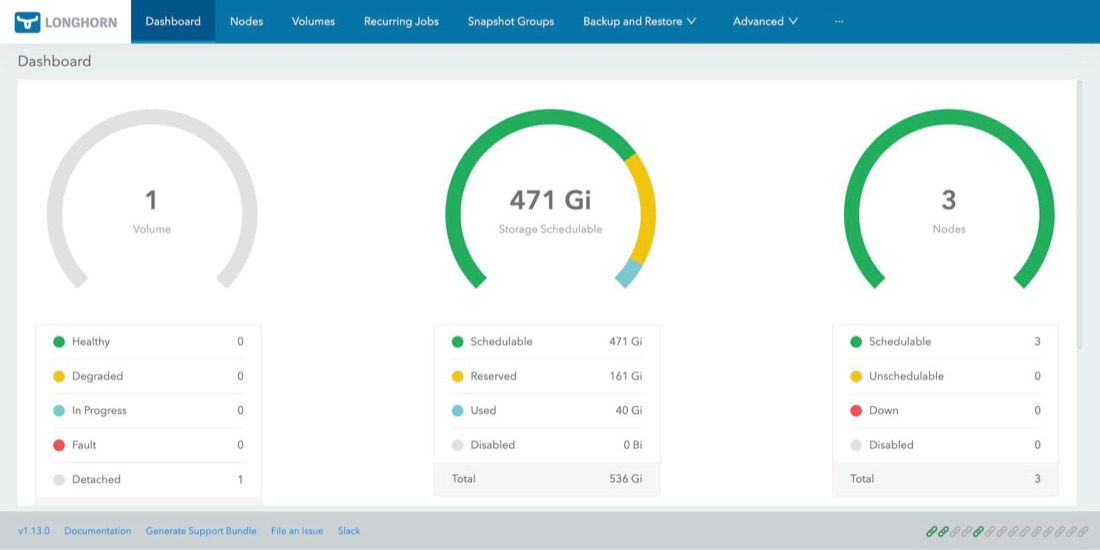
Its UI has no login screen and is not published by the Gateway: it opens with kubectl -n longhorn-system port-forward svc/longhorn-frontend 8080:80 and http://127.0.0.1:8080. The dashboard summarizes volumes, space, and nodes:
View screenshot: Longhorn dashboard
kubectl label node invincible node.longhorn.io/create-default-disk=true
kubectl label node deborah node.longhorn.io/create-default-disk=true
kubectl label node oliver node.longhorn.io/create-default-disk=false
With numberOfReplicas: "2" and 2 eligible nodes (x86 + arm64), each volume is replicated across architectures.
This decision in other environments
Longhorn (longhorn-mixto, 2 replicas) replicates important data across the nodes' own disks, and OpenEBS LocalPV (openebs-hostpath, default) provides fast local disk without replicas for rebuildable workloads. No storage array or licenses, and if a node fails critical data remains on the other.
- Benefits: distributed storage on the nodes themselves survives a server failure without data loss, provides snapshots and volumes that move with the pod, and avoids depending on a storage array; separating replicated disk (critical data) from local disk (rebuildable) lowers cost without risking what matters.
- The norm is a corporate SAN/NAS (with its CSI driver) or supported software-defined storage: SUSE Storage (Longhorn's commercial version), Portworx, or Ceph/Rook with support from Red Hat OpenShift Data Foundation or IBM Storage Ceph.
- Replication is not a backup: off-cluster copies (another site or object storage) with defined and tested RPO/RTO (how much data you can lose and how long to recover) are required.
- Dedicated disks and a separate storage network are used, with 3+ replicas and measured performance; here Longhorn shares disk and network with everything else.
- Longhorn does fit small sites, edge, or stores with few nodes and no array, where simplicity and predictable cost matter more than peak performance.
| Cloud | Equivalent service |
|---|---|
| GCP | Persistent Disk / Hyperdisk and Filestore (RWX), with the GKE CSI driver |
| AWS | Amazon EBS and Amazon EFS (RWX), with their CSI drivers (EBS, EFS) |
| Azure | Azure Disk Storage and Azure Files (RWX), with the AKS CSI drivers |
| Oracle Cloud (OCI) | Block Volume and File Storage (RWX), with the OKE CSI driver |
You get managed disks with replication, snapshots, and provider SLA, without managing storage nodes. You lose control and portability: each cloud has its own classes and limits, and a block disk is usually tied to a zone.
Cluster StorageClasses
A StorageClass tells Kubernetes how to create a PersistentVolumeClaim (PVC) volume. Here are the ones that exist today (kubectl get storageclass); those from gitops/storage/ are created by the Application homelab-storage, the rest come from charts or K3s.
| StorageClass | Created by | Provisioner | Replicas | Binding | Expandable | Default? |
|---|---|---|---|---|---|---|
openebs-hostpath |
gitops/storage/openebs-local.yaml |
OpenEBS LocalPV (openebs.io/local) |
1 (node disk) | WaitForFirstConsumer |
No | Yes |
local-path |
K3s (addon local-storage) |
rancher.io/local-path |
1 (node disk) | WaitForFirstConsumer |
No | Yes (see warning) |
longhorn |
Longhorn chart | Longhorn (driver.longhorn.io) |
defaultClassReplicaCount (2 in longhorn.yaml) |
Immediate |
Yes | No |
longhorn-mixto |
gitops/storage/storageclasses.yaml |
Longhorn | 2 fixed | Immediate |
Yes | No |
longhorn-static |
Longhorn chart | Longhorn | — (no parameters) | Immediate |
Yes | No |
All have reclaimPolicy: Delete: deleting the PVC deletes the volume and its data.
Two default StorageClasses today
openebs-hostpath and local-path carry the annotation is-default-class. With two defaults, a PVC without storageClassName is ambiguous: Kubernetes uses the one created most recently and the result depends on the order each was installed.
The recommendation is to keep only one. In Ansible, local-storage is already in k3s_install.core.disable_components (alongside traefik and servicelb), but that only affects new installs: this cluster retains local-path until K3s is reinstalled. Meanwhile, always request the class explicitly in PVCs.
openebs-hostpath — local, fast, node-bound
Creates a folder on the disk of the node where the pod runs.
| Pros | Cons |
|---|---|
| Fastest: local disk, no network or replication | No replication: if the node goes down, data is unavailable until it returns |
| Near-zero RAM/CPU overhead; works the same on x86_64 and ARM64 | Pod is pinned to the node where the volume was born: cannot be rescheduled elsewhere |
| Works on all 3 nodes, no disk or package prep needed | Cannot be expanded, no snapshots or quotas (pod can fill the node disk) |
With WaitForFirstConsumer the volume is born where the scheduler places the pod |
Only ReadWriteOnce (single node at a time) |
Use for: caches, rebuildable data, test databases, anything you can lose painlessly.
local-path — the K3s one
Same model as openebs-hostpath (local folder, no replication, node-bound), but ships with K3s. Today it duplicates the previous one: see the warning above. Do not use it in new manifests.
longhorn and longhorn-mixto — replicated
Longhorn stores each volume as a replicated block across multiple nodes, with snapshots, backups, and a UI.
| Pros | Cons |
|---|---|
| Survives a node failure: replicas live on different nodes (x86_64 and ARM64) | Writes are slower: every write is acknowledged on all replicas over the network |
Can be expanded live (allowVolumeExpansion), with snapshots and backups |
Consumes extra RAM and CPU on each node (managers, instance managers) and space: with 2 replicas, 2× the size |
ReadWriteMany (multiple pods at once) via an NFS server per volume |
Requires open-iscsi and nfs-common on nodes (role k3s_prereqs) |
| UI to inspect each volume's state | With Immediate replicas are scheduled without knowing where the pod will run, so reads may go over the network |
Which one:
longhorn: its replicas come from the chart value (defaultClassReplicaCount). If someone changes the chart, the behavior of new PVCs changes. This is whatarc-cacheuses today (the runners' cache).longhorn-mixto: 2 fixed replicas,dataLocality: disabled(replica does not stick to the pod's node: more fault-tolerant, more network traffic) andstaleReplicaTimeout: 30(minutes before discarding a stale replica). Use it when you want a replica count that does not depend on the chart.
Use for: data that matters (databases, application state) and shared volumes.
StorageClass parameters cannot be edited
Kubernetes does not allow changing the parameters of an existing StorageClass. To change replicas you must delete and recreate the class (existing PVCs do not change). Today kubectl get storageclass longhorn may show numberOfReplicas: "3" even though longhorn.yaml asks for 2, if the class was created before the change; with 3 replicas and few eligible nodes volumes end up degraded.
On how many nodes does Longhorn live?
The node.longhorn.io/create-default-disk labels above are only honored if the setting createDefaultDiskLabeledNodes is set to true. Today it is set to false (verified with kubectl -n longhorn-system get settings.longhorn.io), so all three nodes contribute disk, including oliver. To limit it to invincible and deborah, enable that setting in defaultSettings of longhorn.yaml and disable oliver's disk in the UI.
In the Longhorn UI: Node → oliver → Edit node and disks → on its disk, Scheduling to Disable → Save.
Check the disk name and disable its scheduling on the nodes.longhorn.io resource:
longhorn-static — only for pre-existing volumes
Parameterless class created by the chart to manually bind a volume that already exists in Longhorn (static provisioning). It does not create new volumes on its own: do not use it in a regular PVC.
Binding: WaitForFirstConsumer or Immediate
| Mode | What it does | Trade-off |
|---|---|---|
WaitForFirstConsumer (both local) |
Waits for the pod to be scheduled and creates the volume on that node | Volume always lands with the pod; afterward it stays bound to that node |
Immediate (Longhorn's) |
Creates the volume as soon as the PVC exists | Works without a pod, but replicas are chosen without knowing the pod's node |
Which one do I choose?
| I need… | Use |
|---|---|
| Data I cannot lose, or the pod to be able to move nodes | longhorn-mixto |
| Fastest possible and data is rebuildable | openebs-hostpath |
A volume used by multiple pods at once (ReadWriteMany) |
longhorn or longhorn-mixto |
| Grow a volume without recreating it | longhorn or longhorn-mixto |
| Deleting the PVC not to delete the data | None: all are Delete; create a class with reclaimPolicy: Retain |
To request a class, put it in the PVC:
spec:
  storageClassName: longhorn-mixto
  accessModes: [ReadWriteOnce]
  resources:
    requests:
      storage: 10Gi
Upgrade and reinstall Longhorn
Longhorn only supports upgrading one minor version at a time (1.6 → 1.7 → … → 1.13). If the chart skips versions, the
longhorn-pre-upgrade Job fails on purpose and, if you disable it, the new
longhorn-manager crash with
upgrading from vX to vY for minor version is not supported. During an upgrade do not disable that Job. In a
clean install with Argo CD you do have to disable it (preUpgradeChecker.jobEnabled: false): it runs before its
ServiceAccount, cannot create the pod, and the sync stays waiting for it forever.
If what Longhorn stores can be lost (in the HomeLab, the ARC cache —Actions Runner Controller—), it is faster to reinstall from scratch on the new version than to step through every intermediate version. Use
playbook-reset-longhorn.yml,
which is destructive (deletes PVCs, volumes, CRDs, the namespace, and /var/lib/longhorn on each node) and safe
by default: without -e longhorn_reset_confirm=true it only shows what would be lost.
- In
gitops/bootstrap/root-appset.yaml, comment outlonghornandarc-runnersand push. This way Argo CD does not recreate what gets deleted (the Applications disappear, their resources remain in the cluster). ansible-playbook -i inventory.ini playbook-reset-longhorn.yml(preflight) and then with-e longhorn_reset_confirm=true.- Uncomment
longhornandarc-runners, push: Argo CD installs the version fromtargetRevisionfrom scratch.
Why not Mayastor
Mayastor requires ≥2 GiB of fixed hugepages — ruled out for the M700.
Runnable guide: Phase 4 — GitOps.